The invisible cost of your banking operations.
See how much your company pays in bank fees, at which banks, and for which services — with a catalog that translates each statement description into a name, category, and list price.
Fee by fee, bank by bank, no spreadsheets.

Visibility that didn't exist before
Bank fees hide across thousands of statement lines, under names nobody understands. Now they show up totaled, named, and categorized.

Negotiating power
Compare what you pay against the list price at 21 banks — and see where the same service costs more.

Zero manual work
No classifying fees by hand: the catalog automatically maps 5,300 bank names to 654 standardized fees.
From the monthly total down to the charge on the statement.
In a few clicks, without leaving the screen
1. Fees surface on their own
Every fee charge is identified automatically in the statements of every connected account — no need to search line by line.

2. Every charge gets a name and a category
The catalog translates the bank's description into a standardized fee and groups it by category — even when every bank calls the service something different.

3. The monthly total, right in front of you
How much you paid, how it changed, where it weighs most, and what fell outside the pattern — with the trend over the last 12 months.

Every real in fees, explained
From the group total to the entry on the statement, with four views of the same cut: charts, list, matrix, and charges.
How much we pay, and what changed
The monthly total, the change versus the previous period, and the 12-month trend. Alongside, where it weighs most: the bank, company, fee, and category that cost the most.

One standardized catalog across multiple banks
Hundreds of standardized fees grouping thousands of bank names, each with a description, category, list price, and a link to the institution's official document.

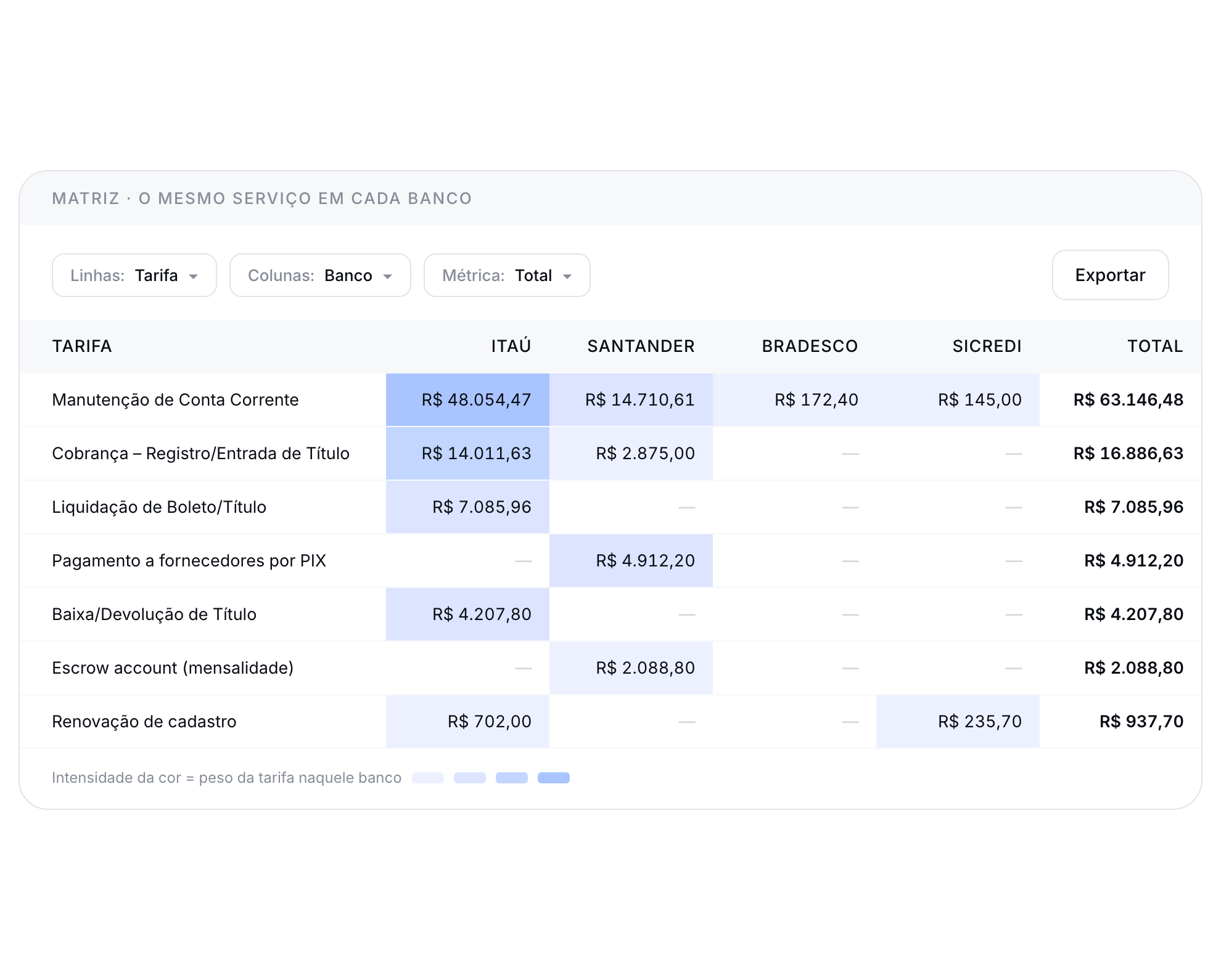
The same service costs differently at every bank
Cross fee by bank, company, or category and see the weight of each combination — the evidence you were missing to renegotiate.
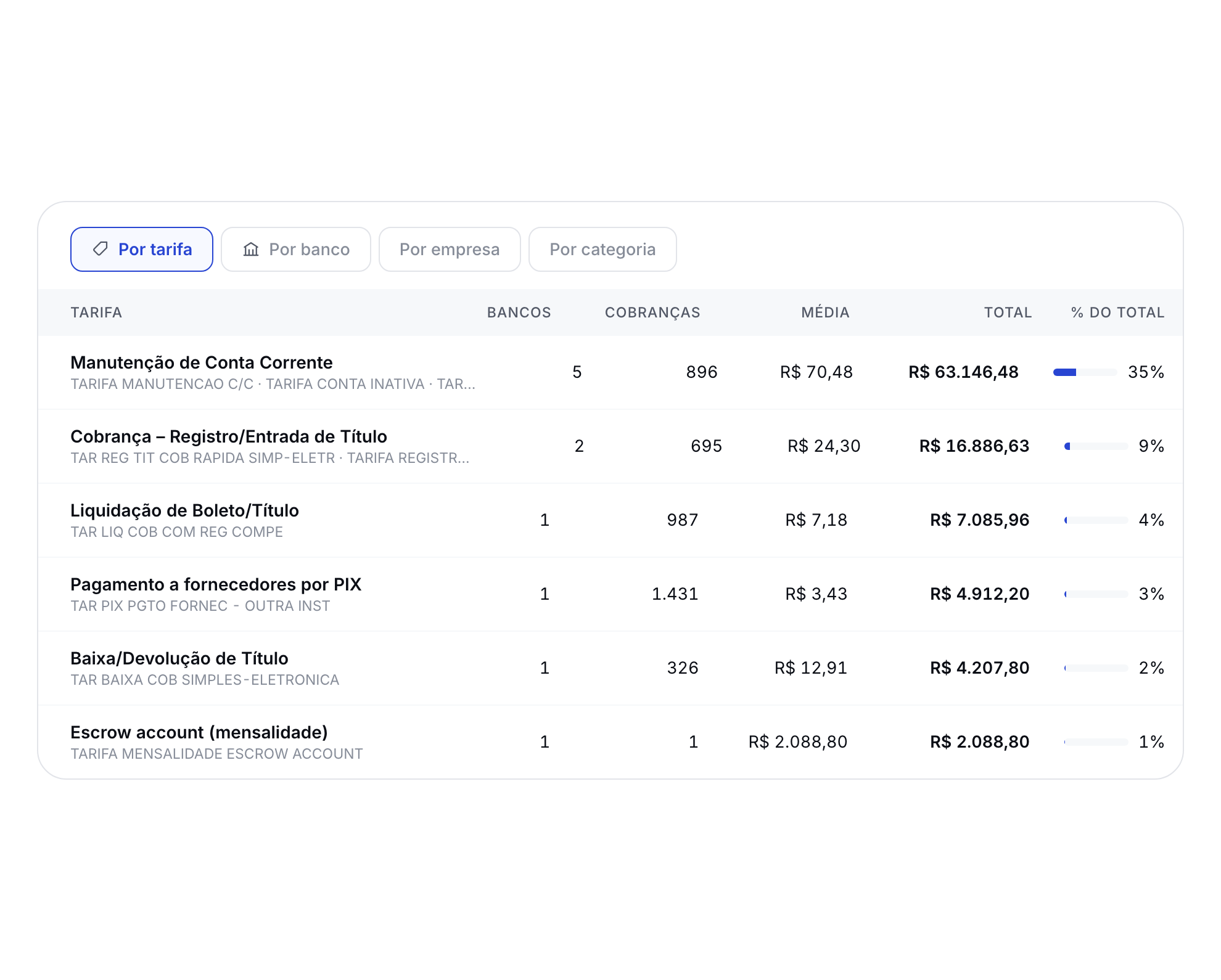
Four cuts, one question each
By fee, by bank, by company, or by category: number of charges, average per charge, and share of the total.
Every analysis ends at the statement line.
Drill down from the monthly total to the individual charge, with the bank's original description, the account, and the company — and open it directly in Transactions.

Frequently asked questions
How does Datanomik identify fees in my bank statements?

Automatically. Transactions from every connected account run through a standardized fee catalog that recognizes fee charges even when the statement description is abbreviated or varies from bank to bank. You don't need to classify anything by hand.
What is the standardized fee catalog?
It's a single catalog with hundreds of standardized fees grouping thousands of names used by 50+ banks. Each standardized fee has a description, a category, each bank's equivalent names ("also known as"), the list price, and a link to the institution's official document.
Can I compare what I pay against the bank's list price?
Yes. For each standardized fee, you see which banks charge for that service and each one's list price, with the official source. That lets you compare the same service across banks and use the data in renegotiations.
What views does the module include?
Four views of the same cut: charts (monthly total, 12-month trend, and composition), list (a ranking with charges, average, and total), matrix (a two-axis cross, such as fee by bank), and charges (the individual transactions). All of them respect the period and filters selected at the top.
Can I see fees by company within the group?
Yes. Data can be cut by fee, bank, company, or category, with combined filters — useful for groups with many legal entities and hundreds of accounts.
What if a charge isn't recognized?
The module is transparent about it: charges that couldn't be classified with confidence are flagged as "no reliable categorization", with the amount and the share of the period they represent. We also flag out-of-pattern charges and the average per charge, so you can review anything unexpected.
Ready to transform your treasury?
Fill out the form and our team will get in touch shortly.

Allan Andrade
Datanomik Treasury Manager